![black.png]](https://helpcenter.predictap.com/hs-fs/hubfs/black.png?height=40&name=black.png)
As an invoice flows through PredictAP it will go through multiple status changes. Here's the typical invoice lifecycle:
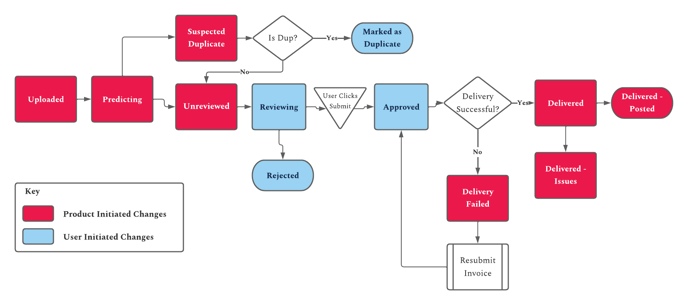
These are the corresponding statuses you will see associated with an invoice:
Historical Record
- This is the status assigned to the historical invoices we loaded as part of your account setup.
Unreviewed
- The invoice is ready for editing (the processing has been completed).
Suspected Duplicate
- If the product thinks the invoice is a duplicate, this is the status that will be assigned.
Marked as Duplicate
- If the invoice was marked as a duplicate by your team, this would be the final status for it.
Rejected
- If you do not want to continue coding the invoice but still want to keep a record of it, you can assign it to this status.
- Note, there is no ability to delete invoices entirely from the PredictAP platform. If a user does need the ability to permanently delete invoices please reach out to support@predictap.com.
Reviewing
- The invoice is currently being edited/reviewed on your end.
Approved
- The invoice is done being coded and was submitted. The next status will be confirmation that it was successfully accepted by Yardi.
Delivered
- The invoice was successfully submitted to Yardi.
- The invoice can no longer be edited in PreditAP at this point.
Delivery Failed
- If Yardi rejects the invoice for any reason you will see this status. When you click submit on an invoice and delivery fails, you'll be shown a message with the reason why. If you don't understand the reason, please reach out to support@predictap with a screenshot of the message you're seeing.
Delivered - Posted
- This status is assigned when the Invoice has been posted in Yardi.
Delivered - Issues
- If an invoice is successfully delivered to Yardi, however we will not be able to sync the status in the future for the invoice, it will get set to this state.
- The most common reasons for this status to be set is due to a conflict with Vendor-Property security settings in Yardi, or the invoice was deleted after it was delivered to Yardi.