![black.png]](https://helpcenter.predictap.com/hs-fs/hubfs/black.png?height=40&name=black.png)
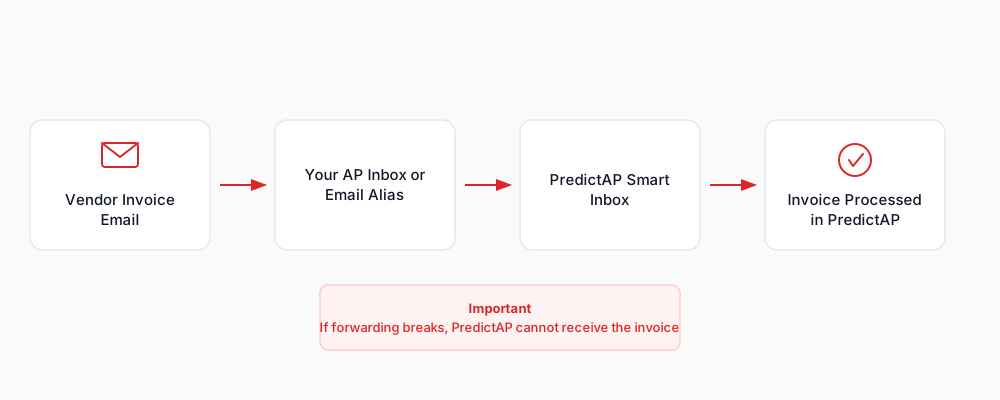
When vendors send invoices to your company’s AP inbox or email alias, those emails are automatically forwarded to your PredictAP Smart Invoice Inbox.
Once the email and attachment reach the Smart Invoice Inbox, PredictAP can ingest and process the invoice.
PredictAP does not retrieve invoices directly from your email inbox. Invoices must be successfully forwarded to the Smart Invoice Inbox in order to be processed successfully.
Frequently Asked Questions
Why isn’t an invoice reaching PredictAP?
Invoices may fail to reach PredictAP if email forwarding is not working as expected or if the invoice email does not meet ingestion requirements. Common causes include disabled or modified forwarding rules, email security or anti-spam policies blocking the message, unsupported attachment formats, or file size limitations.
Where should I check first if invoices are missing?
Start by confirming that email forwarding is still enabled and that no recent changes were made to forwarding rules or mailbox settings. Verify that vendors are sending invoices to the correct AP inbox or email alias and that those emails are forwarding to the PredictAP Inbox.
Can email security or spam policies affect invoice delivery?
Yes. Email security, anti-spam, or filtering rules can prevent invoice emails or attachments from being forwarded, even if forwarding is configured. Ensure no rules or policies are blocking outbound forwarding to PredictAP
Does PredictAP monitor or pull emails from my inbox?
No. PredictAP only processes invoices that are forwarded to the Smart Invoice Inbox.
What should I do if everything looks correct, but invoices are still missing?
If forwarding appears to be configured correctly and invoices are still not reaching PredictAP, please contact PredictAP Support for assistance.
Need Setup or Configuration Details?
Email Forwarding to PredictAP from Microsoft 365
Email Forwarding to PredictAP from Google Workspace