![black.png]](https://helpcenter.predictap.com/hs-fs/hubfs/black.png?height=40&name=black.png)
Overview
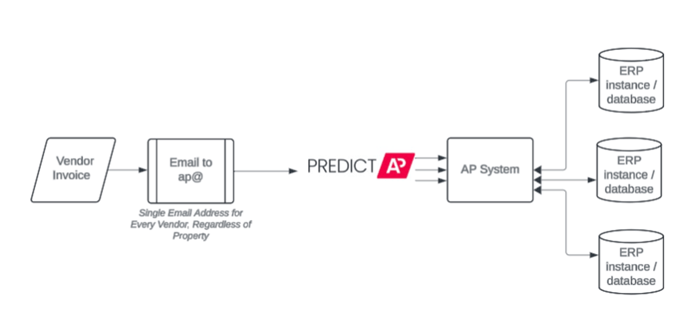
AutoRoute eliminates the complexity of managing invoices across multiple properties and ERP systems. Instead of requiring vendors to send invoices to different email addresses for each property or system, AutoRoute allows you to use a single vendor-facing email address.
AutoRoute analyzes incoming invoices and routes them to the correct environment based on property information, vendor patterns, and historical data. This is particularly valuable for Third-Party Management companies managing properties across different integration packages like MRI, Yardi, or RealPage.
Key Features and Functions
Centralized Email Ingestion - Vendors send all invoices to one customer-branded email address (such as AP@yourcompany.com), which automatically forwards to PredictAP for processing.
Intelligent Routing - The prediction engine analyzes invoice content including property information, vendor history, and historical patterns to determine the correct destination environment and ERP system.
Adaptive Property Migration - When properties move between integration packages, AutoRoute automatically updates routing based on your property records in Nexus, ensuring invoices continue flowing to the correct system.
Verify Routing Workflow - When AutoRoute has low confidence in a routing decision, the system prompts users to confirm the correct destination, preventing incorrect deliveries while teaching the prediction engine for future invoices.
Manual Re-routing - Users can manually correct routing decisions after initial processing through a simple menu option, with complete audit trail tracking.
Getting Started
To enable AutoRoute for your organization:
- Provide your preferred domain for your branded AP email address
- Configure email forwarding from your domain to your PredictAP address
- Work with your PredictAP team to map your tenant environments to your integration packages
- Ensure property-to-environment associations are configured in Nexus
Once configured, invoices sent to your centralized email address will automatically route to the appropriate environment.
Common Use Cases
Third-Party Management Companies - Manage invoices for properties across multiple owner portfolios, each with different ERP systems, while maintaining a single vendor contact point.
Portfolio Transitions - When acquiring new properties or transitioning properties between management systems, AutoRoute adapts automatically based on your Nexus property records without requiring vendor communication changes.
Exception Handling - Quickly correct routing errors or verify low-confidence predictions through simple user interface prompts without disrupting the automated workflow.
Additional Resources & Related content
For questions about configuring AutoRoute or managing property records in Nexus, contact your PredictAP support team.
Related features: Direct Delivery