![black.png]](https://helpcenter.predictap.com/hs-fs/hubfs/black.png?height=40&name=black.png)
View Original Email in the User Interface
View the original email content alongside the invoice document during invoice review without leaving the screen.
Overview
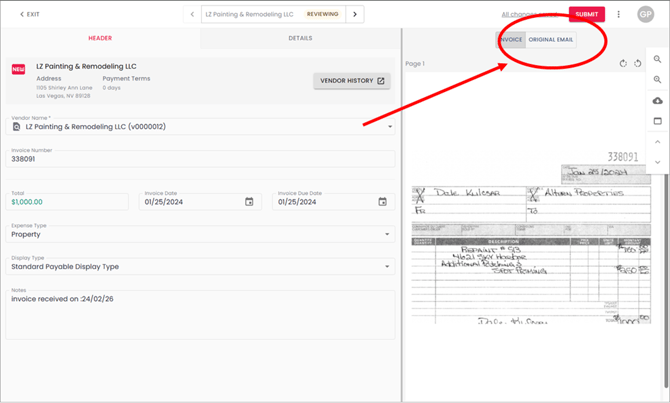
The Original Email tab feature provides complete context when reviewing email-submitted invoices by displaying the original email content directly in the invoice review interface. Instead of switching between PredictAP and your email system to reference vendor messages, you can now see both the invoice document and the accompanying email in one place. This enhancement improves efficiency and decision-making by providing all relevant information at your fingertips during the coding process.
Key Features and Functions
Tabbed Interface - The right panel of the invoice review screen now contains two tabs: "Invoice" (showing the invoice document) and "Original Email" (showing the complete email content).
Preserved Formatting - The original email displays with all formatting intact, including fonts, colors, and spacing, ensuring accurate interpretation of vendor messages.
Complete Email Context - View the full email body that accompanied the invoice, including any instructions, explanations, or additional information from the vendor.
Seamless Navigation - Switch between the invoice and email with a single click, with your tab selection persisting throughout the current review session.
Smart Display - The Original Email tab only appears when an invoice was submitted via email; manually uploaded invoices show only the Invoice tab.
Getting Started
No setup is required. When reviewing invoices submitted via email:
- Navigate to the invoice review screen as usual
- Look for the tabbed interface in the right side panel
- Click the "Original Email" tab to view the complete email content
- Switch back to the "Invoice" tab to view the document
The Invoice tab remains the default view, maintaining your familiar workflow.
Common Use Cases
Vendor Instructions - Review special payment instructions, account changes, or billing notes included in the vendor's email without leaving the invoice screen.
Coding Decisions - Reference email details that clarify which property, project, or account code should be used when the invoice itself is ambiguous.
Exception Resolution - Quickly access vendor explanations for unusual charges, corrected invoices, or billing adjustments mentioned in the accompanying email.
Additional Resources & Related content
For questions about using the Email Tab feature or troubleshooting display issues, contact your PredictAP support team.